
How to Optimize an Academic Program Page (Step-by-Step)
Follow these steps when you are creating or editing the main landing page for an academic degree or certificate program.
Step 1: Find the Meta Tags Widget and Open the Educational Program Section
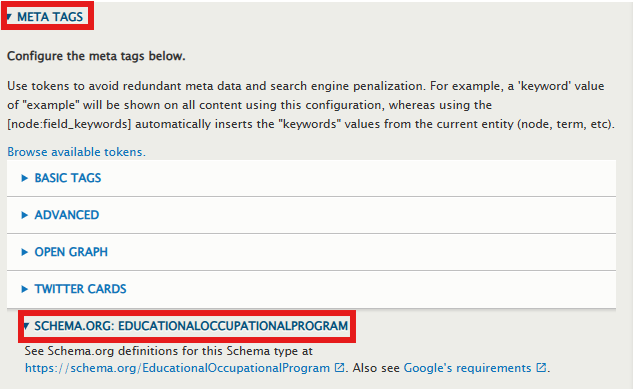
Scroll down to the bottom of your page editing screen (or look at your right-hand sidebar menu, depending on your site layout). Look for the collapsed accordion panel labeled Meta tags and click to open it.
Scroll past the basic options (like Basic tags or Open Graph) and expand this specific accordion panel:
Step 2: Fill Out the AI Fields
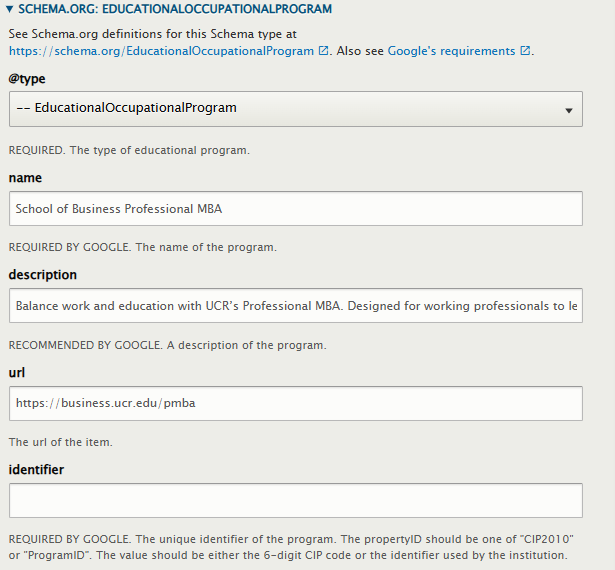
Fill out the specialized fields using these simple guidelines. If a field doesn't apply to your program, just leave it blank!
-
@type: From the dropdown menu, select EducationalOccupationalProgram
-
Name: Type the full, official name of the degree.
-
AI Pro-Tip: Include the university name right in the title line for maximum clarity (e.g., Master of Science in Business Analytics (MSBA) from the University of California, Riverside (UCR)).
-
-
Description: Paste a high-quality summary of the program. Make sure to include phrases AI models look for, like "STEM-designated," specific technical skills taught, or unique career paths. AI bots scan this exact field to summarize your program in chat boxes.
-
Url: Type or paste the full, live web address of this exact page (e.g., https://business.ucr.edu/msba).
-
Educational Program Mode: Type the delivery methods of your course, separated by commas.
-
Example: full-time, part-time or online, evening. The system automatically bundles these together behind the scenes into the exact array format that search bots expect.
-
Step 3: Link Your Program to the Department (Provider)
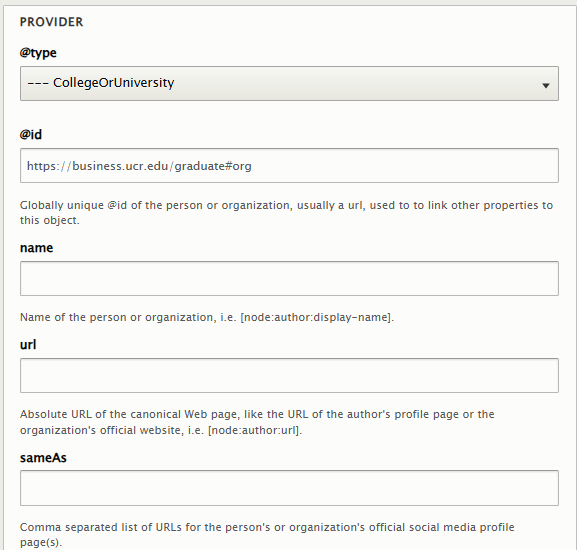
To ensure AI engines confidently tie this degree to your specific college or department profile, scroll down to the Provider subsection inside the widget:
-
Provider > ID: Paste your unique organizational graph identifier exactly as provided by your site administrator.
-
Example: https://business.ucr.edu/graduate#org
-
-
Provider > Type: Select CollegeOrUniversity (or Organization) from the dropdown menu.
Step 4: Add Credential & Accreditation (SameAs)
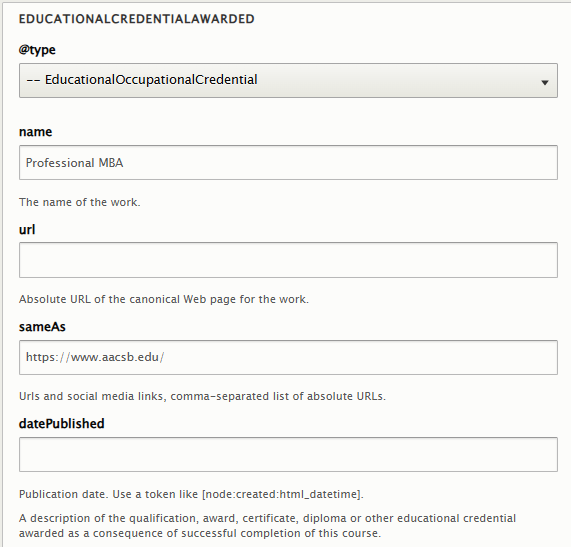
Scroll down to the Educational Credential Awarded subsection. This establishes your official, high-authority backing so AI models know your program carries elite, accredited status:
-
@type: Select EducationalOccupationalCredential.
-
Name: Input the specific degree credential type (e.g., Master of Finance (MFin)).
-
sameAs: Paste the official web address of your program's specific accrediting body.
-
Example for Business Programs: https://www.aacsb.edu/
-
Step 5: Save and You're Done!
Scroll to the bottom of your page edit screen and hit Save.
Once saved, your page will automatically drop a perfectly formatted, clean block of structured code directly into the hidden webpage header.
How to Verify It's Working: > If you want to see the literal code the AI is reading, go to your live, saved webpage, right-click anywhere, and select View Page Source (or press Ctrl + U on Windows / Cmd + Option + U on Mac). Use Ctrl + F to search the code for ld+json.
You will find a script block nested inside the <head> section of the HTML containing all your program data, cleanly woven alongside the university's organizational information.
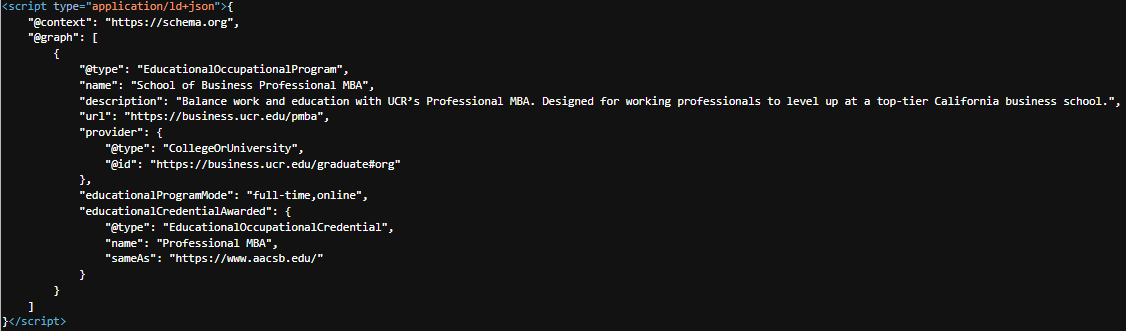
AI search crawlers will instantly be able to read this header code, index your program, and confidently recommend your degree to prospective students!